Your website can look amazing — sleek design, bold colors, gorgeous images. But here’s the blunt truth: if it’s not coded properly, Google won’t find it. And if Google can’t find it, neither can AI.
That’s where schema markup comes in.
Schema is like adding labels to your content so search engines understand what it is. Without it, your site might look like a beautiful storefront with no sign out front. With it, you’re telling Google (and now AI engines) exactly who you are, what you do, and why you should be the one chosen.
What Schema Really Does (No Jargon, Promise)
Think of schema as structured data — extra context in your code that explains your business to search engines.
It’s like walking into a grocery store. Without aisle labels, everything looks like a jumble of products. But with clear signage? You find the milk, bread, and snacks in seconds. Schema is those aisle labels — it tells Google where your “business hours,” “reviews,” or “services” live.
And here’s the kicker: Google only recognizes certain types of schema. If you’re wasting time adding ones it doesn’t use, you’ll never see the benefit.
How to Use Schema.org (Okay, This is Jargon-y)
If you’ve never poked around the Schema.org website, here’s the quick tour so you can find the right schema and copy clean examples fast:
Step-by-step: finding the correct schema
Go to Schema.org and use the search bar (e.g., “LocalBusiness,” “Restaurant,” “LegalService,” “Dentist,” “HomeAndConstructionBusiness”).
Open the type page. At the top, you’ll see the type name (e.g.,
LocalBusiness) and a short description.Scroll to Properties to see the fields that type supports (name, address, telephone, openingHours, etc.).
Jump to Examples. You’ll see tabs that show the same example in different formats:
No Markup – plain content (what users see)
Microdata – attributes embedded in HTML
RDFa – another in-HTML format
JSON-LD – the recommended script tag format
Structure – a tidy tree view of the JSON-LD
Prefer JSON-LD. It’s cleaner, easier to maintain, and the format Google recommends.
What the LocalBusiness example is demonstrating (in plain English)
The example you shared is a Restaurant (a subtype of LocalBusiness) and it’s labeling the essentials so Google understands them instantly:
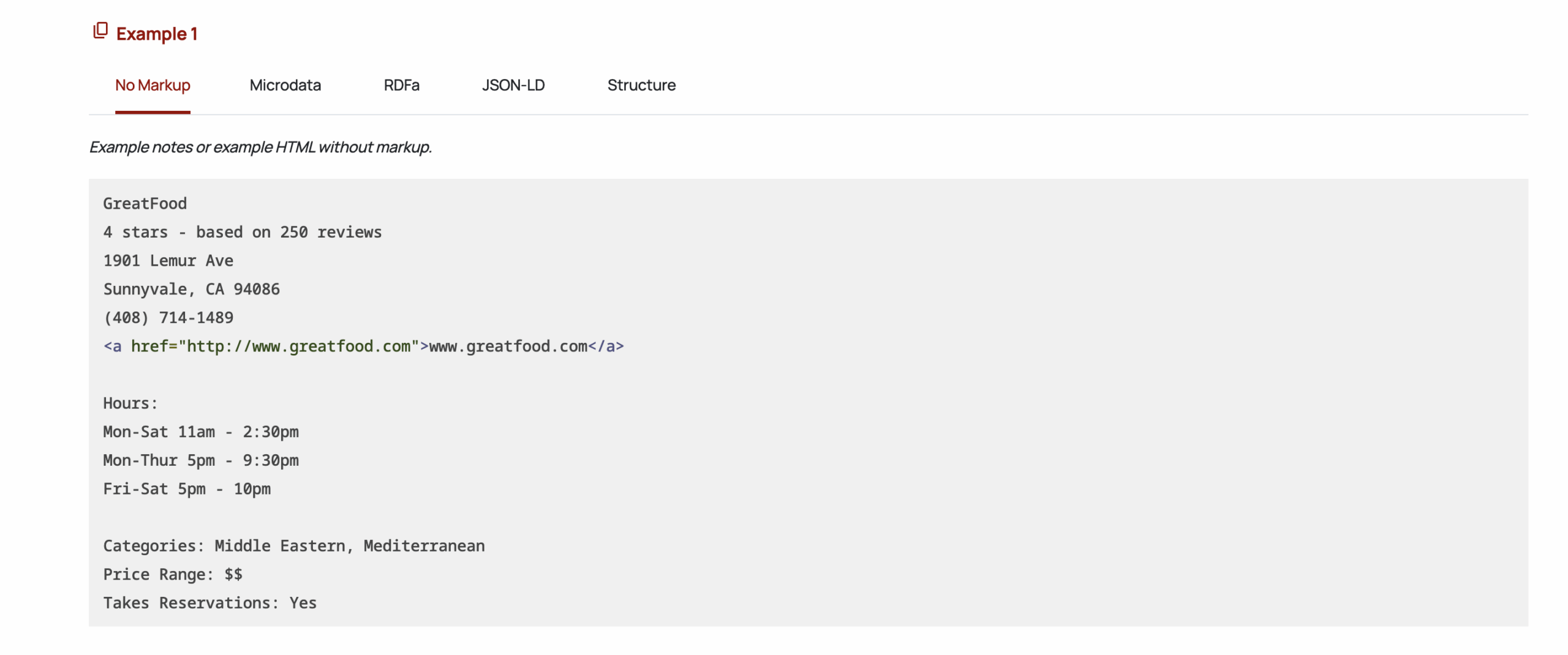
Business identity:
name(“GreatFood”),urlReputation:
aggregateRating(4 stars, 250 reviews)NAP details:
address(PostalAddresswith street, city, region, postalCode),telephoneHours:
openingHours(compact strings like “Mo-Sa 11:00-14:30”)What it offers:
servesCuisine(Middle Eastern, Mediterranean)Price signal:
priceRange(“$$”)
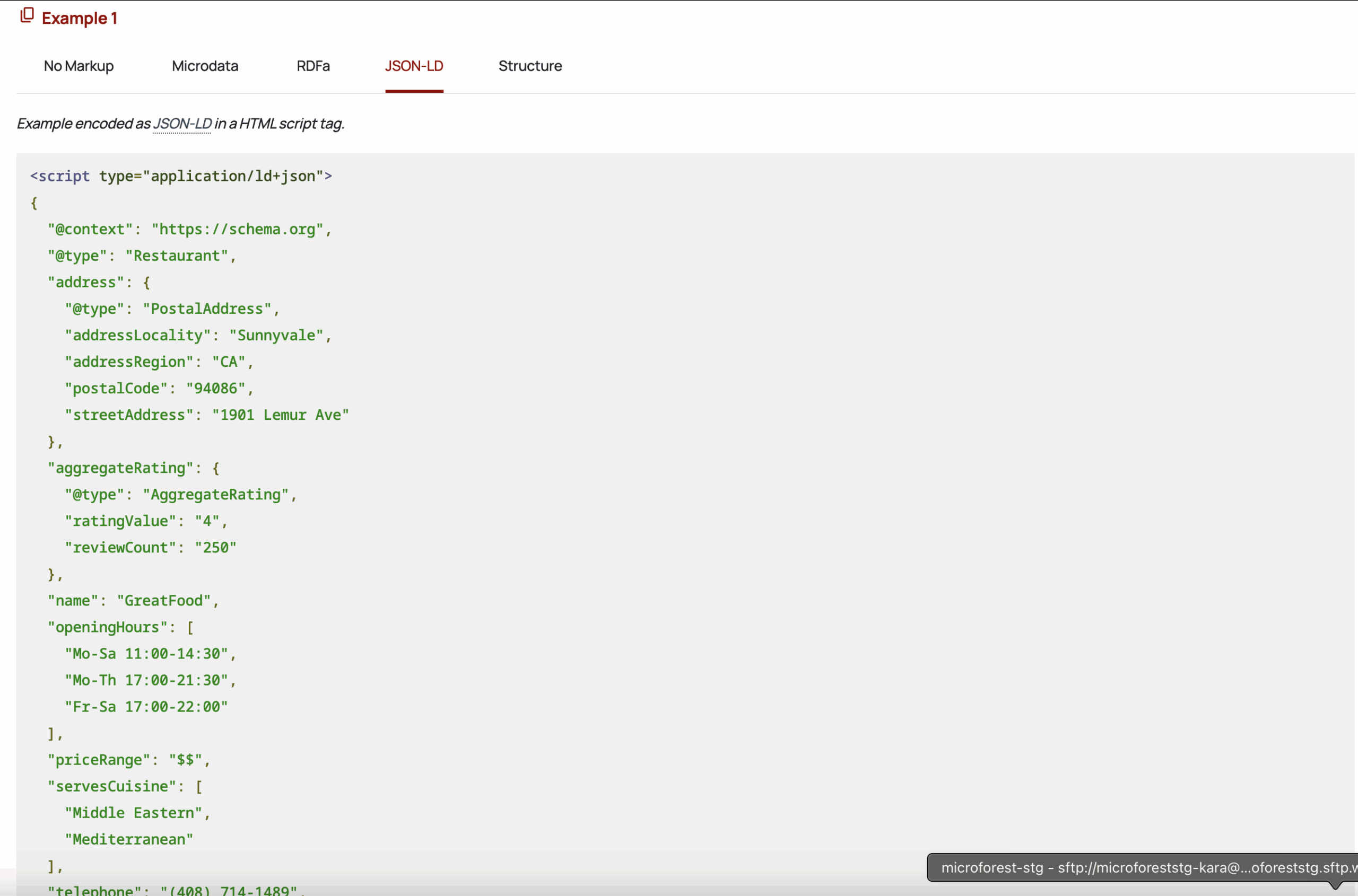
The magic isn’t fancy wording—it’s the labels. With those labels, search engines (and AI) can trust and reuse your facts.
Copy-paste starter: JSON-LD for a local business
Use this as a base and swap the subtype and fields to fit (e.g., LegalService, HomeAndConstructionBusiness, MedicalBusiness, Dentist, DaySpa, etc.). Keep it in one <script> tag on the page.
Pro tips
Pick the closest subtype to your business (e.g.,
LegalService,HVACBusinessviaHomeAndConstructionBusiness,Dentist,DaySpa). Subtyping improves clarity.Use
openingHoursSpecification(shown above) instead of the olderopeningHoursstrings for better structure.Make sure the details in schema match your visible page content (name, phone, hours, addresses, prices). Mismatches can reduce trust.
Add FAQ schema at the bottom of key pages (3–5 tight Q&As). It’s a fast, high-impact win.
After publishing, validate with a structured data tester and check Search Console’s Enhancements to confirm detection.
Where this fits your experience
I’ve implemented advanced schemas at scale (airline flight, airport, destination content). When we added the correct types and properties—and matched them tightly to on-page content—the result was richer search displays, higher visibility, and more qualified clicks. The same principles apply to small businesses: the right labels + clean structure = better visibility in both Google and AI answers.
Google Only Rewards Certain Schema
Inside Google Search Console, there’s a defined list of schema types that actually matter:
FAQ schema (those dropdown Q&As you’ve seen in search results).
LocalBusiness schema (your name, address, phone — NAP details).
Review schema (star ratings in search results).
HowTo schema (step-by-step instructions).
Product schema (for e-commerce).
Use these the right way, and suddenly your search listing stands out with stars, FAQs, or expanded results. Skip them, and you’re left looking like every other plain blue link.
Real-World Proof: Airline Schema
I’ve implemented schema at a large scale — including an airline website where we rolled out flight schema, airport schema, and destination schema. We added this to over 2 million pages.
The result? Those pages didn’t just show up — they dominated. Google displayed structured flight details directly in the search results, driving higher visibility, more clicks, and stronger brand trust. It was a smaller brand that most people haven’t heard of and it was competing with the big-budget brands.
That’s the power of schema. It’s not theory. It’s practical, measurable impact.
Easy Wins for Small Businesses
You don’t need to be an airline to take advantage of schema. In fact, small businesses have the most to gain.
Here are schema quick wins you can apply today:
FAQ schema: Add 3–5 of your most common questions to your service or blog pages.
LocalBusiness schema: Make sure your business name, address, and phone number are crystal clear.
Review schema: Display testimonials or Google review ratings in search results.
Service schema: Label the services you provide so they’re instantly recognizable.
These aren’t technical nightmares — they’re simple steps that make your website more visible than the competition.
The Problem with “Pretty but Useless” Websites
This is where so many businesses go wrong. They invest in a gorgeous site, or their cousin Frank, but the developer skips the structured data. Or even worse, it’s not even setup by a developer at ALL – be sure to know the difference between someone setting up good looking sites (web designer) vs. someone who sets up a nice design on a high-functioning site (web developer).
So yes, the website looks great… but Google has no idea what it’s looking at. Which means customers never see it.
A pretty site that doesn’t show up online is like a billboard in the desert. Schema is what puts that billboard in the middle of Main Street.
Why Schema Matters Even More in the Age of AI
AI engines like Google’s AI Overviews, ChatGPT, and Gemini don’t just scrape text — they pull trusted, structured data. Schema sends strong credibility signals that your site is worth citing.
That means if your competitors are adding schema and you’re not, their answers will show up in AI summaries while yours disappear into the void.
How to Get Started
Here’s what I recommend:
Audit your site: Check what schema you already have with Google Search Console or a schema validator tool.
Start small: Add FAQs or LocalBusiness schema to your most important pages.
Be consistent: Make sure your NAP details match across your website, Google Business Profile, and directories.
Work with an expert: More advanced schema (services, reviews, or niche types) is best handled by someone who knows how to code it right.
The Bottom Line
Your website deserves more than just a pretty design. With the right structure, it can be found, trusted, and chosen — by both Google and AI.
Schema markup isn’t optional anymore. It’s the secret ingredient that separates the sites that rank from the sites that vanish.
👉 Ready to make sure your website is not just seen but chosen? Let’s talk.
What is schema markup, in plain English?
Schema is “labels” in your code that explain your content to Google and AI—things like your business name, hours, services, reviews, and location. Clear labels = higher chance of rich results and being chosen in AI answers.
Which schema types should most small businesses start with?
Start with LocalBusiness (and the closest subtype), FAQ, and AggregateRating/Review if you have legitimate reviews. Add OpeningHoursSpecification, GeoCoordinates, and SameAs links for consistency.
Does schema guarantee higher rankings or traffic?
No. Schema improves eligibility for rich results and helps AI understand your pages. Rankings still depend on content quality, authority, and overall site health.
JSON-LD vs. Microdata vs. RDFa — which should I use?
Use JSON-LD. It’s Google’s preferred format, easier to maintain, and doesn’t require editing your visible HTML.
Where do I put schema on my site?
On the specific page it describes, inside a <script type="application/ld+json"> tag (head or body). Make sure the details match what users can see on that page.
What are fast schema wins I can add this week?
LocalBusiness with accurate NAP, hours, geo, and SameAs.
FAQ with 3–5 real customer questions.
AggregateRating only if you have authentic, displayable reviews.
How do I validate and monitor schema?
Use a structured data testing tool (Rich Results Test / a schema validator) before publishing, then check Google Search Console → Enhancements to see what Google detects over time.
How often should I update schema?
Any time your info changes (hours, phone, services, pricing models), and when you publish new key pages. Keep schema in sync with your page content and your Google Business Profile.

